
Using audit logs
Every API request in your organization is recorded for 365 days - who, what, when, from where, and under which application. It's the first place to look when you need to know what happened.
Every API request in your organization is logged automatically and kept for 365 days - from the console, your integration, and your teammates alike. Find it under Audit Logs in the sidebar.
#What's recorded
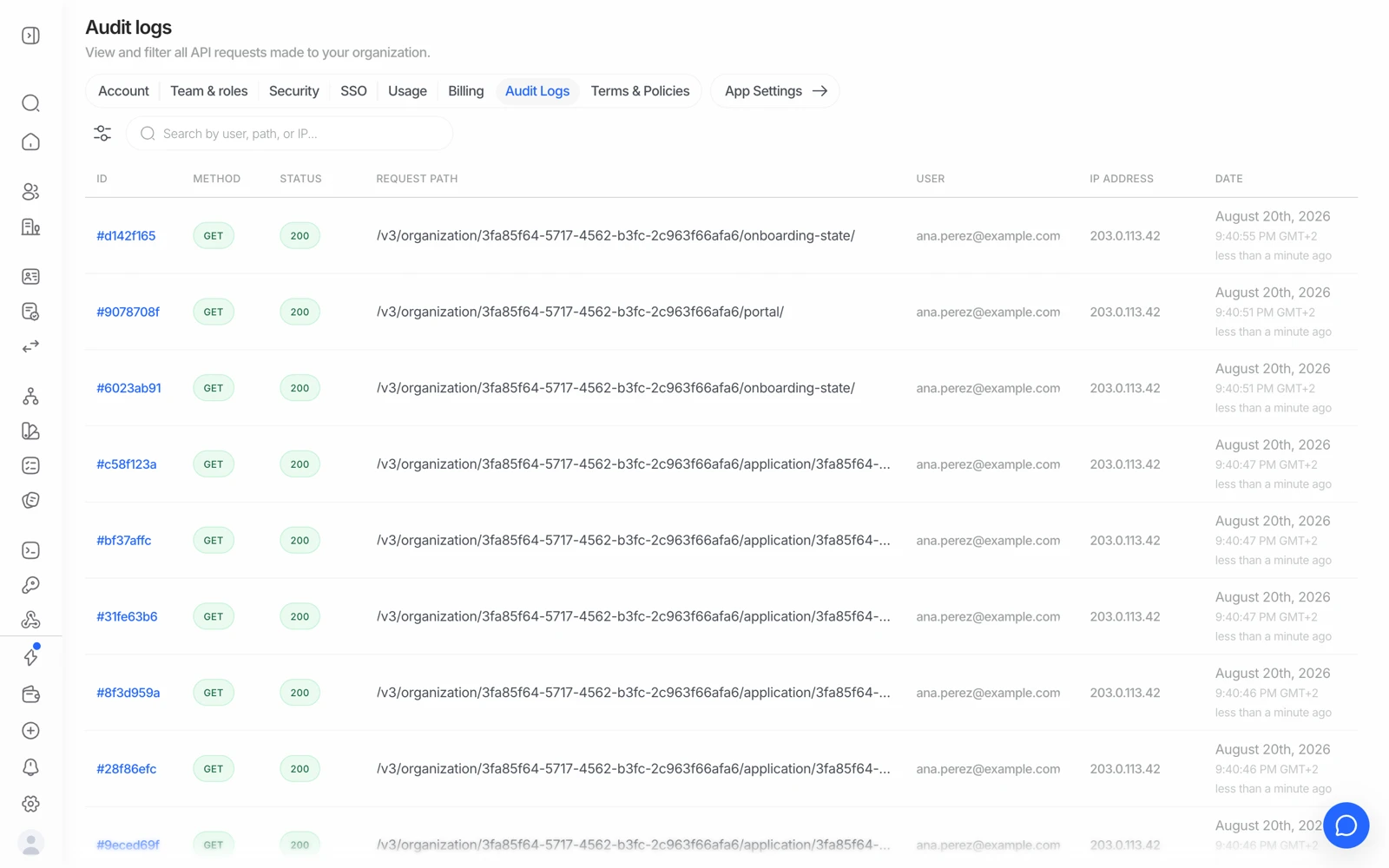
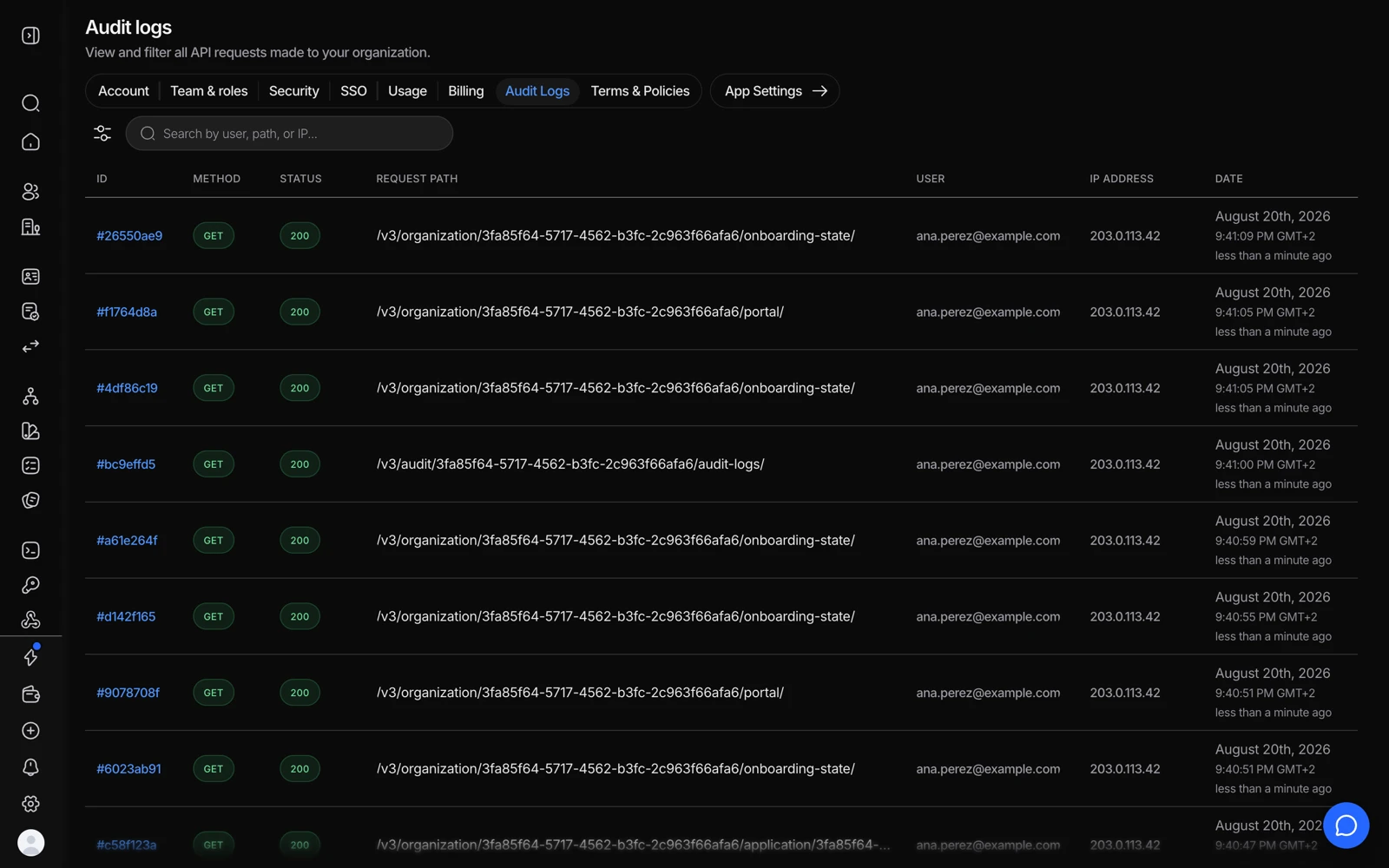
- Filter by member, path, method or date to answer 'who changed this'.
- Method and status separate a read from a change that actually took effect.
- The member who made the call.
- Where it came from - the detail that turns a log into evidence.
Every request made to the Didit platform within your organization, whatever made it. Each entry carries:
| Field | Detail |
|---|---|
| Timestamp | When the request was made |
| User | The authenticated user's email. Empty for API-key requests, which are attributed to the application instead |
| Method | GET, POST, PUT, DELETE |
| Path | The endpoint that was called |
| Status | The HTTP response status |
| IP address | Where the request came from |
| Application | Which application it belonged to |
Logs are retained for 365 days and then deleted automatically.
#What it's actually for
Four situations where it's the right tool:
- "Who changed this workflow?" A flow behaving differently than yesterday usually has an edit behind it, and the log names who made it.
- Investigating an incident. Tracing exactly what was accessed, by whom, from which address, in what order.
- Debugging an integration. Seeing the requests your own code actually made, rather than the ones you believe it made - including the ones that 4xx'd.
- Evidencing access control. Showing an auditor that access to verification data is attributed and reviewable.
#Filtering
Filter by user, endpoint, or date range to narrow a long list. When you're investigating something specific, start from the timestamp and work outwards - a request rarely happens alone, and the calls immediately around it usually tell the story.
#API-key requests are attributed to the application, not a person
An API-key request has no user to attribute it to, so it shows against the application. That's the honest representation - the platform genuinely doesn't know which of your services or engineers made the call.
The practical consequence: a single key shared across several services makes an incident materially harder to investigate. If attribution matters to you, give each consumer its own application and key.
#What's in the log, and what isn't
The log records activity - who called what, when, from where, and what status came back. It is a metadata trail, not a copy of the verification data.
If you need to know whether customer personal data appears in these entries - a question that comes up during data-protection reviews - get the answer from your Didit contact and record it, rather than inferring it from a help page. It's exactly the kind of statement your own DPIA will be expected to evidence.
#Who can see it
Audit log access follows role. Compliance Officer includes it; Reader does not have broad access. Owners can grant it to a custom role. See inviting team members and setting roles.
Removing a teammate doesn't remove their history from the log - which is the point. A trail you can edit isn't a trail.
#Exports and reports are logged too
Generating a session PDF or a CSV export is an API call, so it appears here with who made it. That's useful when you need to show that access to verification evidence is controlled rather than open. See downloading a verification report.
#If you need longer than 365 days
The retention is fixed at 365 days. If your obligation is longer, export what you need on a schedule and keep it in your own system - the same pattern as retaining session evidence yourself. Deciding the required period is a compliance decision for your team; don't design around an assumption.
Audit-log retention and verification-data retention are separate settings. Configuring a short retention window for session data doesn't shorten the audit log, and the reverse is also true. See how Didit protects your users' data.