Didit does not email you when a verification changes status. Set up a webhook so your backend hears about it at once, and verify the signature first.
A webhook is an HTTP request Didit sends to your URL when something changes. Add an endpoint under Developers → Webhooks, subscribe to the events you want - there is no wildcard, list every one - save the signing secret, and verify the signature before you process anything.
Didit doesn't send you an email when a session moves to In review or Declined. To find out the moment a status changes, without refreshing the console, set up a webhook - a URL on your server that Didit sends the update to automatically.
Webhooks are the recommended integration pattern. Polling the decision endpoint works as a fallback, but it's slower, costs more requests, and misses events that are only ever delivered by webhook - data edits made by a reviewer, transaction status changes, and entity-level changes.
#Setting one up
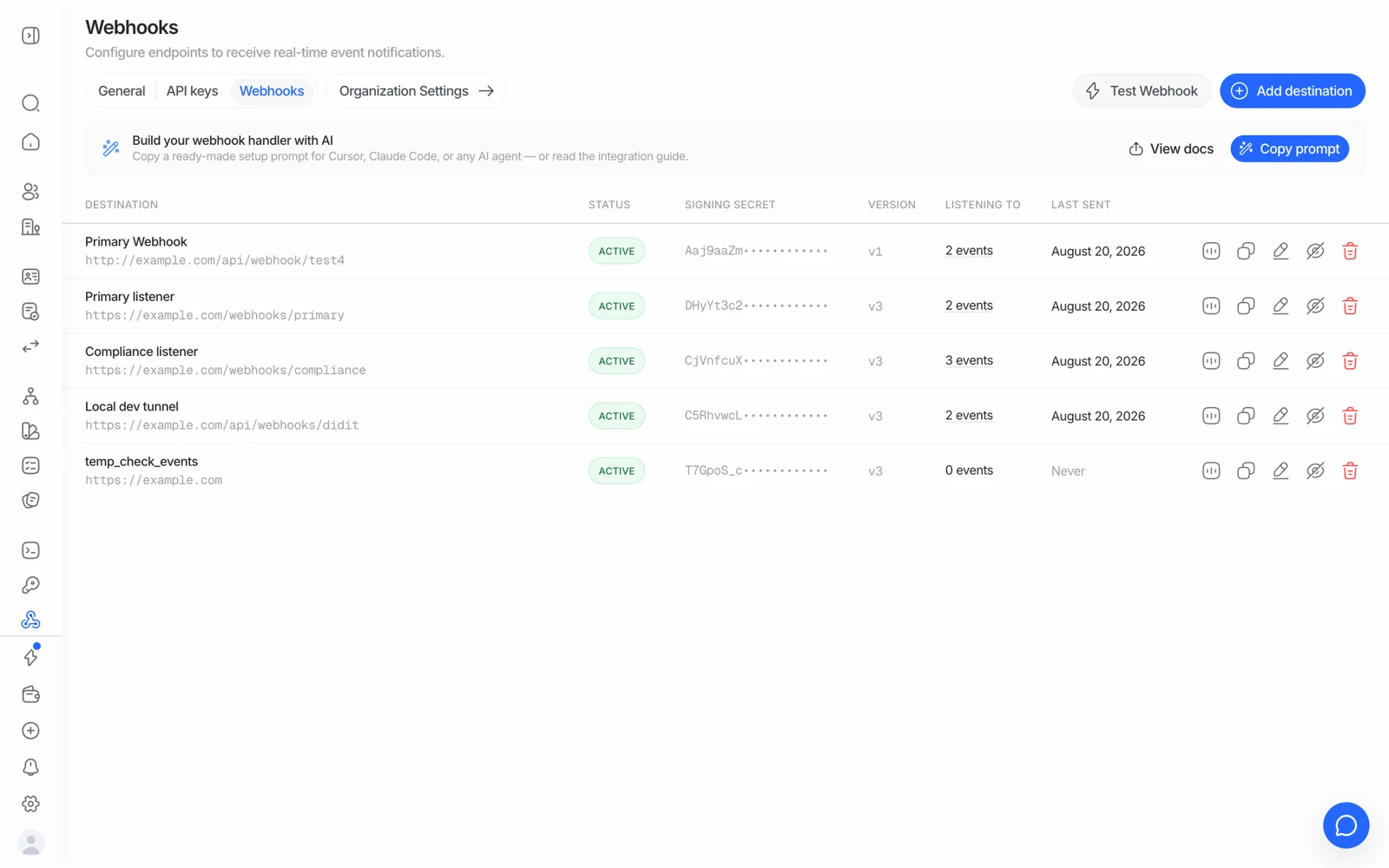
- Go to Developers, then Webhooks
In the Business Console, open the application (and the environment, Live or Sandbox) you want to receive events for, then go to Developers → Webhooks.
- Add an endpoint
Press Add endpoint. Enter your endpoint's public HTTPS Endpoint URL and a Name, pick the events you want to receive (session status changes at minimum), keep the recommended webhook version (v3) unless you're maintaining an older integration, and confirm on the review step.
- Save the signing secret
Each endpoint has its own signing secret, shown masked on the endpoint's page. Press Reveal and confirm it's you to see it; it hides again within 60 seconds. Save it in your server's configuration - your server uses it to confirm a request really came from Didit rather than an impersonator. If Reveal is greyed out for you, contact support. Full verification steps: Signature verification.
- Test it
Use Send test event to send a fully-formed, signed test event - approved, declined, in review, KYB, entity, and transaction scenarios - to your endpoint. You can validate your integration this way without running an actual verification.
#The events you can subscribe to
There is no wildcard - list every event family you want. Spreading them across several endpoints is fine and often cleaner.
| Event | Fires when |
|---|---|
status.updated | A KYC or KYB session's status changes. The one you almost certainly want |
data.updated | Verification data is edited after creation - a reviewer correcting a field |
user.status.updated | A consolidated user moves between ACTIVE, FLAGGED and BLOCKED |
user.data.updated | A consolidated user's profile, counters or identifiers change |
business.status.updated | A consolidated business changes status |
business.data.updated | A consolidated business's data changes |
transaction.created | A transaction is created and its initial verdict is ready |
transaction.status.updated | A transaction's status changes afterwards |
travel_rule.status.updated | A Travel Rule exchange's status changes |
There is no session.status.updated or kyc.completed. If you subscribed to a
name that isn't in this list, you'll receive nothing - and it will look exactly
like a delivery failure. Check the name first.
#What your endpoint should do
- Verify the signature before anything else. HMAC the raw request body - never a re-serialised version of the parsed JSON, because re-stringifying changes the bytes and the signature won't match. Use a constant-time comparison.
- Return a 2xx fast. Didit waits 5 seconds for an answer. Do heavy work asynchronously, after you've responded.
- Be idempotent. Key on the event id, or on session id + status + webhook type. Retries and duplicates happen.
- Handle every status you care about, including the ones that arrive long after onboarding - an approved session can later move to In review through ongoing AML monitoring.
- HTTPS only. Plain HTTP endpoints aren't supported.
#Retries
When your endpoint answers with a 5xx or a 404, Didit retries twice:
- First retry about 1 minute after the first attempt
- Second retry about 4 minutes after that
A delivery that times out (no answer within 5 seconds) or can't connect is not retried automatically. Every attempt is logged in the endpoint's Deliveries list, so you can see exactly what happened rather than guessing, and Resend on a delivery sends it again by hand. When a delivery still fails after its retries, your team gets an alert in the console.
Two retries over five minutes is not a durable queue. If your endpoint is down for an hour, those events won't arrive on their own. Resend them from the Deliveries list, or reconcile on start-up by polling the decision endpoint for sessions you have no terminal status for - webhooks are the fast path, not the only path.
#Behind a firewall or WAF
Didit delivers from the static IP 18.203.201.92 with a DiditWebhook/2.0 user agent. If your edge blocks unknown clients - Cloudflare's default posture, for instance - allow that IP for the receiving hostname, or deliveries will fail before they reach your code.
#Don't have a backend yet?
You can still monitor results manually in the console's User verifications list while you build one out, or use a no-code verification link in the meantime.
#Next steps
- When a webhook doesn't arrive: when a webhook never arrives
- Understand what each status means once it arrives: what each session status means
- Full technical reference, including signature verification code samples: Webhooks
Still stuck? Talk to a human.
Include your organization ID and the session ID you are asking about.