Messages keeps one thread per person you verify, by email, SMS and WhatsApp. Reply, edit templates, automate reminders with Autopilot, use your own senders.
Open Identity verification → Messages. Each person you verify has one thread with every code, link, status email, reminder and message your team sent, and their replies. Templates sets the wording per event, Autopilot sends reminders and status messages for you, and Channels connects email, SMS and WhatsApp senders.
Messages is rolling out and may not be switched on for your organization yet. If Messages is missing from the sidebar, it isn't available to you yet.
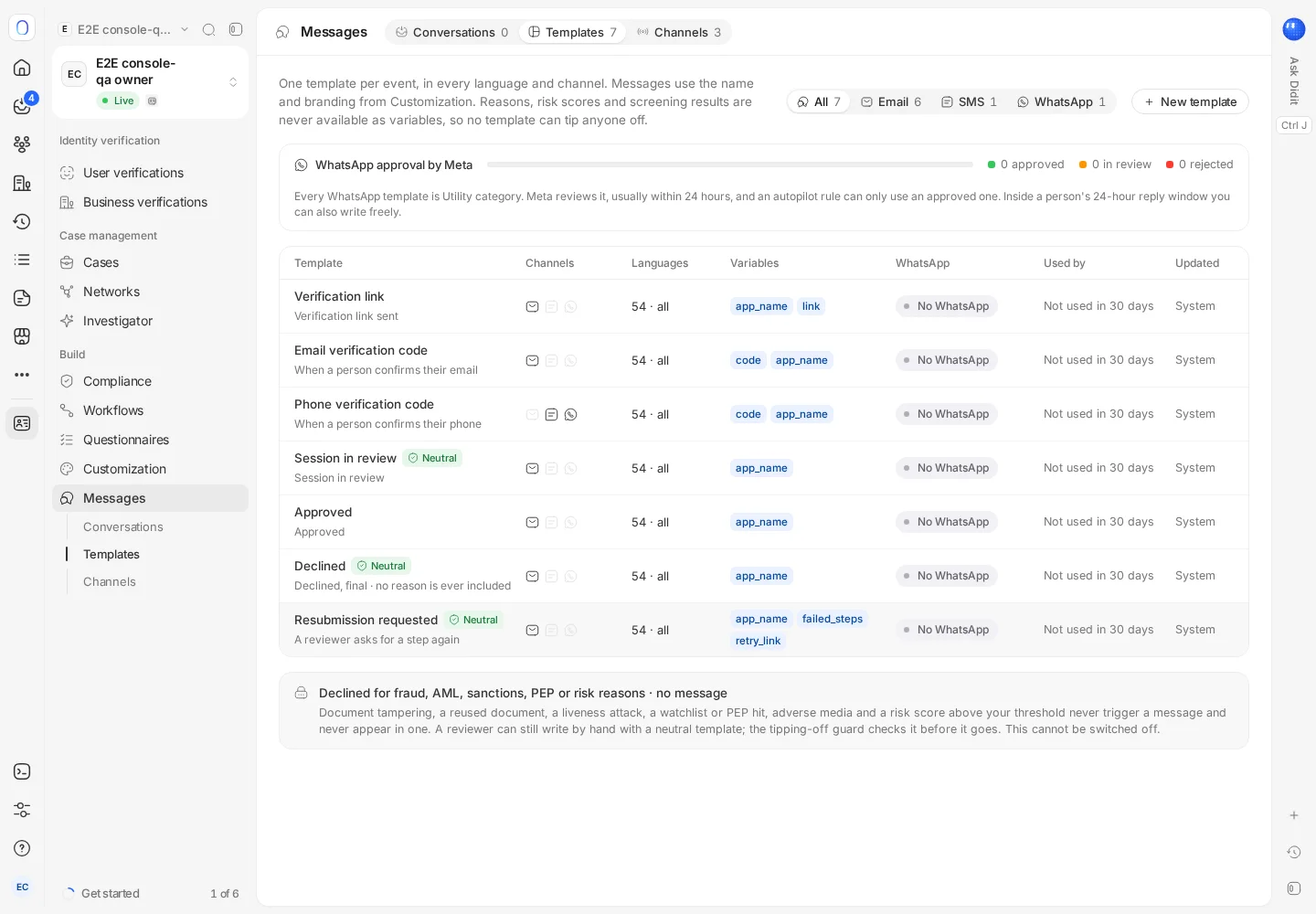
#Conversations
Conversations lists one thread per person. Search by name, email, phone or ID, and filter by Needs reply or Failed, by channel, or by the kind of message (verification codes, links, status emails, retries, reminders, resubmission requests or replies).
Every message shows how far it got: sent, delivered, opened, read, and whether the person opened the link or entered the code. Write to the person from the thread, by the channel and template you pick. Messages scheduled by Autopilot show in the thread, where you can cancel them. Open verification jumps to the session the conversation is about.
#Templates
There is one template per event, in every language and channel you use. Reasons, risk scores and screening results are never available as template variables, so a message can't reveal why someone was declined. WhatsApp templates are reviewed by Meta, usually within 24 hours, before they can be sent.
The texts of Didit's own verification emails are edited in Customization → Texts. See customizing branding and the user experience.
#Autopilot
Autopilot is rolling out, and needs an eligible Identity plan where it's available. It sends the right message after each event, one rule per event: the email verification code, the verification link, a session in review, approved, declined with a retry possible, an abandoned session reminder, a resubmission requested by a reviewer, and replies from people.
- Quiet hours apply in each person's own time zone, so nobody gets a reminder at 3 am.
- A daily cap limits how many messages one person can receive, across all rules and channels.
- The tipping-off guard is always on: fraud, AML, sanctions, PEP and similar reasons are never sent automatically, and no rule or role can switch that off. A final decline never triggers an automatic message.
Autopilot itself is free; you pay only for the messages it sends.
#Channels
| Channel | How to set it up |
|---|---|
| Always on. To send from your own domain, add a sender, publish the DNS records it gives you, then verify and send a test. It takes about 10 minutes | |
| SMS | Choose a sender name and send a test. Countries that don't accept sender names, such as the United States and Canada, receive messages from a number |
| Connect your WhatsApp Business account through Meta's sign-up, submit your templates, then send a test |
Until you connect your own sender, messages go out from Didit's.
#What it costs
Email works on every plan, and each email is charged at the price shown when you send it, from your plan credit or balance. SMS and WhatsApp open after your first top-up, and are paid from your plan credit or your balance, never from free credit. See how pricing and credits work.
#Who can use it
Reading conversations needs access to messages or to verifications. Sending messages, editing templates and changing Autopilot need write access to messages or verifications. See inviting team members and setting roles.
Still stuck? Talk to a human.
Include your organization ID and the session ID you are asking about.